How to Dispose of Business Computers Securely

A Simple Guide for Businesses Retiring Old Technology
Every business reaches the same point eventually.
The old laptops are piling up in a closet.
That server from ten years ago is still sitting in the IT room "just in case."
An empty office is commandeered as a office graveyard.
Until someone asks, "Can we finally get rid of all this stuff?"
But then comes the bigger question:
How? Or more specifically, how do you safely dispose of old business computers without putting sensitive company data at risk?
The good news is that getting rid of old business computers securely doesn't have to be complicated. With the right process, you can protect sensitive data, securely dispose of old computers and hard drives, document what happened to them, and responsibly recycle the equipment that's left.
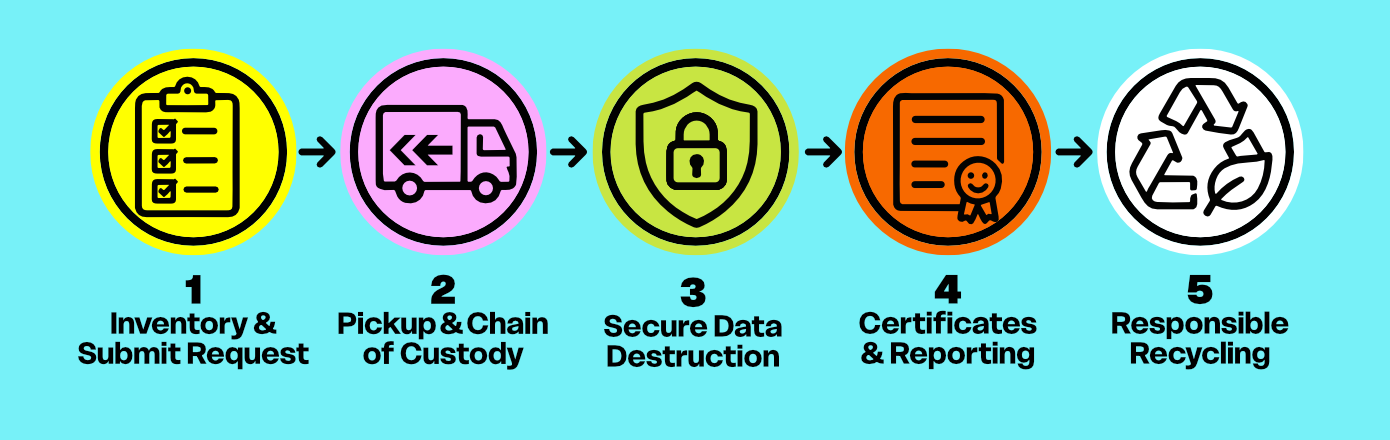
Step 1: Figure Out What You Have
Before anything leaves your office, it's worth taking a quick inventory.
That doesn't mean creating an elaborate spreadsheet. It can be as simple as gathering your old computers and IT equipment into one place and identifying what you're retiring. Once you start actively looking, it can be surprising how much you find.
You might have:
Desktop computers
Laptops
Servers
External hard drives
Docking stations
Network equipment
Monitors and accessories
The biggest thing to identify is which devices contain data.
Old computers, company laptops, servers, hard drives, solid-state drives, phones, tablets, and many networking devices can all still contain sensitive company data, even if they haven't been turned on in years.
Sometimes businesses are surprised by just how much sensitive data is still sitting on old computers and hard drives they assumed were empty, potentially putting that information at more risk years later than it ever was while the equipment was in use.
Step 2: Keep Everything Together
Once you've decided what's leaving your organization, try to keep those devices together until pickup.
The fewer times equipment changes hands, the better.
At TechBack, every business pickup begins with a documented Transfer of Custody, creating a clear record of when your equipment left your organization and entered ours.
From that point forward, every data-bearing device stays under controlled handling until processing is complete.
Learn about our Free Business Pick-Ups
Step 3: Securely Destroy the Data Before Recycling
One of the biggest misconceptions about recycling old business computers is that recycling comes first.
It doesn't.
If a computer, laptop, server, or hard drive contains company data, secure data destruction comes first.
Every data-bearing device that enters TechBack is immediately secured inside our enclosed ITAD processing space before any recycling begins.
Depending on the device, its condition, and your organization's requirements, data-bearing media is either securely sanitized using NIST SP 800-88 compliant methods or physically destroyed when that's the appropriate solution. Even old computers that no longer work can still contain recoverable data, so a dead device shouldn't be treated as an empty one.
The goal is always the same:
Make your data permanently unrecoverable.
If you'd like to learn more about how we decide between secure wiping and physical destruction, check out our guide on Hard Drive Wiping vs. Physical Destruction.
Step 4: Documentation Matters
Once your equipment has been processed, the paperwork becomes almost as important as the destruction itself.
Good documentation creates a permanent record showing what happened to your equipment after it left your office.
Every TechBack business client receives:
Signed Transfer of Custody
Secure Arrival Confirmation
Certificate of Data Destruction
Certificate of Responsible Recycling
TechBack GiveBack environmental impact report
Organizations with additional compliance requirements can also request premium reporting, including individual device reporting, mapped asset tags, and advanced audit documentation.
You can read more about what goes into a Certificate of Data Destruction in our complete guide.
Step 5: Responsible Recycling
Once data has been securely destroyed, the equipment itself still has value.
Responsible business computer recycling doesn't end with data destruction. Whenever possible, devices and materials are recovered through our network of certified downstream recycling partners, while equipment that cannot be reused is processed so valuable materials can be recovered instead of entering the landfill.
That's part of our Zero Landfill Promise, because protecting your data shouldn't come at the expense of the environment.
It Really Can Be This Simple
Most businesses don't have to figure out what to do with old computers and IT equipment every day.
That's why getting rid of years of retired technology can feel like a much bigger project than it actually is.
A secure business computer disposal process should be straightforward:
Gather your old computers and IT equipment.
Transfer custody securely.
Securely destroy the data.
Document what happened.
Responsibly recycle what's left.
That's exactly the process we've built at TechBack.
Whether you're retiring five laptops or clearing out an entire office, we'll help make the process simple, secure, and completely transparent from pickup through final documentation.
Ready to Retire Your Business Computers?
Whether you're replacing a few laptops or clearing out an entire office, TechBack makes secure business computer disposal simple from start to finish.
We provide free business computer and electronics recycling, secure data destruction, and scheduled business pickups throughout Onondaga County, including Syracuse, East Syracuse, DeWitt, Liverpool, Baldwinsville, Camillus, Manlius, Fayetteville, Cicero, and surrounding communities. We also offer scheduled pickups across Central New York and premium pickup services throughout the Northeast.
Every pickup is backed by documented Chain of Custody, Secure Data Destruction, Certificates of Data Destruction, Responsible Recycling, and our Zero Landfill Promise, so you can retire old technology with confidence instead of wondering what happened after it left your office.
If your organization is planning an office refresh, equipment upgrade, relocation, or simply needs to clear out years of retired technology, we're happy to put together a pickup plan that fits your business.